How to create a Udemy or Coursera clone easily with LearnPress
Of course, we all know that cloning other people’s products is not a good and authentic idea at all. For that reason, instead of creating a Udemy clone, the title of this article could be restated as the following: What you need for your education website to be as powerful as Udemy and Coursera and how LearnPress can help you deal with all that.
Ever since the release of LearnPress, we have received so many questions like “how to build an Udemy Clone” or “how to make a website like Udemy”. Designing your website similar to contemporary popular online learning websites like Udemy, Coursera or EdX is a good way to start your online teaching career for many reasons. This article will go through all the steps and all the things needed to create such a website using LearnPress and its range of education theme like Education WP, Course Builder or eLearning LMS.
Unlike most other LMS, LearnPress is made for small and midsize schools and eLearning Website (recently Open EdX retweeted one of our answer on Quora, confirming LearnPress is ideal for small and midsize educational institutions). LearnPress has a clear target and a clear goal of providing their clients only what they need the most instead of giving a lot of features that its users never need. This product development philosophy has helped ThimPress in saving lots of human resource, and the most important thing is: they have more time to invest in features that are really important, to make them even better.
Currently, LearnPress has a lot of functionalities that are similar to the best eLearning websites out there, and LearnPress did so well that it has climbed to being the best WordPress LMS with the most number of active users – 100,000 users. Using LearnPress to create an online learning platform is now easier than ever and it wouldn’t take too much of your effort. Following this tutorial, you will have an attractive website like Udemy with dozens of advanced LMS features in less and a day and less than 100 dollars. This sum of money will be needed to use for hosting, domain and theme purchase, which are essential for every website development project. This is a step by step tutorial so it doesn’t require any coding experience but if you have experienced with using WordPress, it would be awesome.
Step 1. Set expectations of what a WordPress LMS and Udemy Clone would be like
A. Technical Learning management system role
One normal website does not simply become a great online learning website like Udemy. First, it needs to have an outstanding e-learning solution to be a Coursera, EdX or Udemy clone. How would your website support the learning experience?
1. LMS – Course Management, Curriculum,…
If there is not a complete system that will manage everything like the workflow, how courses are made, how to navigate to a lesson, how to edit a quiz,…, your website would be really messy and a real pain to anyone. LMS is a must for any websites that offer courses and lessons for their visitors. LearnPress was born for this reason. Udemy has a system of their own, but LearnPress can also do the same job exceptionally well.
2. Certificate
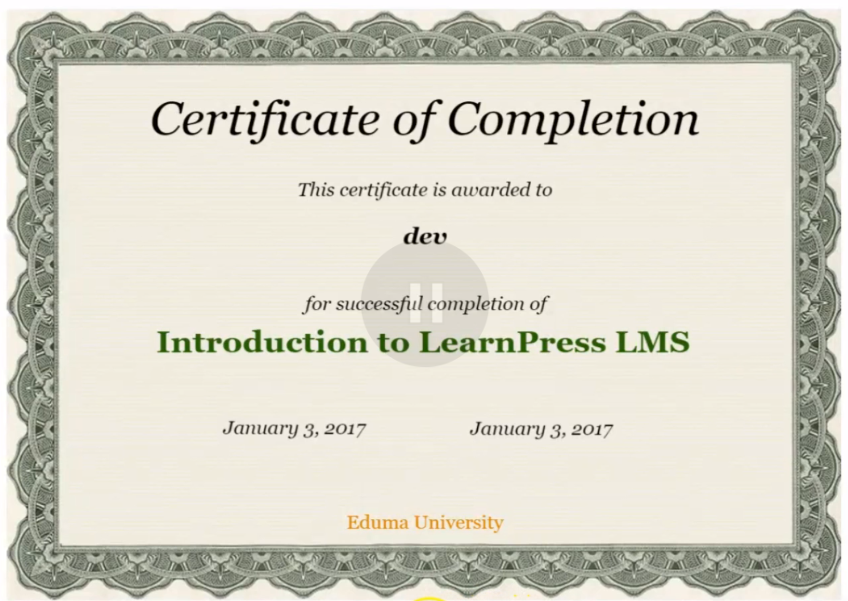
Upon finishing a course, students will be given an online certificate confirming that they have finished a lesson. In Multi-massive open online courses, certificates can be free or you must pay for it, and the certificate for different programs are different. In LearnPress, there is a Certification add-on that make sure every student can receive a certificate. It even allows Drag and drop to assist the instructor in designing better certifications for the students.
3. Content Drip? Why not!
In some courses, learning process is progressive, meaning you have to finish lesson 1 to proceed to lesson 2. In MOOCs and online learning, the same principle applied. Content Drip add-on allows you to decide whether one can take a lesson before viewing other lessons or not.
4. Quiz
The only way to make sure people really understand what is being taught is via practicing and testing. LearnPress has a comprehensive system of quiz and tests with many options. It even has some additional add-ons to improve quiz performance, bringing a brand new experience for people when taking quizzes, answering questions.
II. Sale and marketing role – Sell your online course
How your website will help you sell your online courses, earn money and get some revenue?
1. Payment method
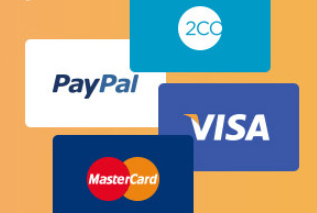
One of the advantage of LearnPress is that it is flexible in choosing payment method for students. This can encourage people to pay their money. This is also true in other MOOCs platform where users can easily choose between many payment option without being restricted. If this process is not optimized, it would make a significant loss to any eLearning website since it is the only way web owner can benefit from.
2. Commission
The tremendous success of Udemy that many other online learning websites cannot accomplish is that they have a system for setting up and calculating commissions. If you only create courses on your own, it is ok, but since affiliate marketing is one of the most effective marketing methods, Commission add-on should be on every eLearning website. This could help you increase your earnings. Commission add-on has just been released a few weeks ago, but it is now one of the most wanted plugins for LearnPress.
3. Paid Membership
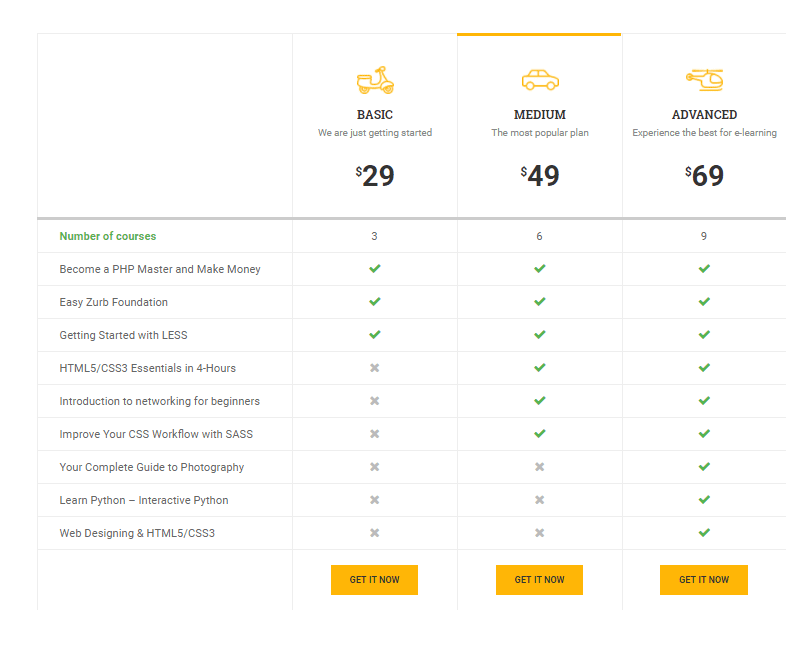
Static pricing is not a one-fits-all solution in most cases. For example, while Udemy applies a fixed price for each product, Lynda offers a yearly package for all available course or Coursera offer specializations that must be paid to learn, or paid to get more benefits. There is an add-on for LearnPress that could help deal with this – Paid Membership Pro. You can create membership levels and assign these levels to each course. It is very effective to help you with boosting your sale.
Ultimate: Good UI and UX
The more important factors in creating such a successful website are: make it friendly, attractive, while easy to use. Udemy and Coursera and most other popular website’s design can prove this. Unfortunately, like all other LMS platform, LearnPress is just a plugin. So, if you want to have a killer-looking UI and UX for your website, you will need an awesome theme.
Since LearnPress is a popular plugin to sell your online course and an open source, many developers and theme makers have made really great themes with it. Here is 7 best themes for LearnPress.
The perks of buying a theme made by LearnPress’ author is that you can get all LP premium add-on for free and that your website would never have to experience any problem with the theme and the plugin.
Step 2: A Step-by-step guide on how to install and setup Udemy Clone in 10 minutes
1. Create Hosting, install WordPress and LearnPress host, WordPress, LearnPress
Learn how to create a website using WordPress at Detailed guideline to create websites using WordPress themes.
As having a hosting and a WordPress website is quite common nowadays for everyone, I will assume that you already have a WordPress website installed. Therefore, I will skip this part to save some time for more complicated tutorials on installing a WordPress theme and installing all LearnPress add-ons.
However, if you haven’t had a WordPress hosting, we suggest you to take a look at the list of best WordPress hosting providers in this article. These are the best WordPress hosting provider around and as we are also using WordPress, our websites are also hosted on WPEngine.
Next, we go on Installing LearnPress.
From you website, let’s presume it’s mywebsite.com, please go to your WordPress Admin Dashboard at mywebsite.com/wp-admin.
Login to your admin account. Go to Plugins > Add new. Search for LearnPress or you can also search for LMS. You will easily find LearnPress right here. It’s the most popular WordPress LMS and also is the best WordPress Learning Management System.
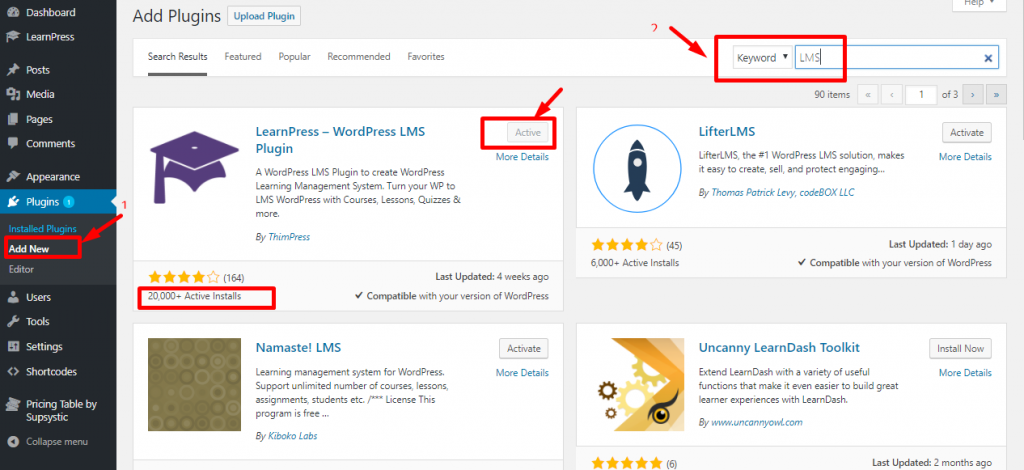
You can read its details or just Install and Activate the plugins.
After installing LearnPress, we can move on to how to make your site become ones like Udemy or Coursera.
2. Choose a suitable WordPress LMS theme to sell your online course.
Currently, on this site, I’m using a WordPress free theme and it looks nothing like my desired website and because it’s a free theme, it’s very limited in features and functionalities. You will not be able to customize it also. Even if you can customize it, it really takes a lot of time and effort to be able to create an online course site like Udemy.
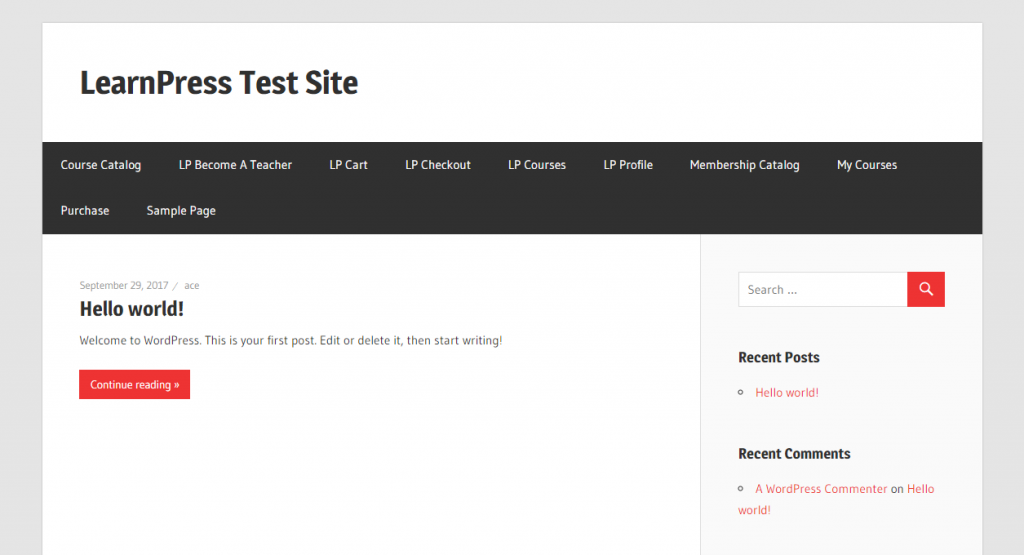
Now is the time to change your WordPress theme to a premium education WordPress theme. You may wonder: Why should I spend my money on a premium education WordPress theme?.
Well, the reason is simple: If you keep going with a free theme, you will end up limiting yourself with the lack of flexibility a free theme could offer. Besides, LearnPress premium LMS WordPress themes are pre-designed by a team of experienced web designers. There is a team of talented developers in a way that it would take you years of developing if you try to build your own project.
This could waste thousands and thousands of potential dollars you could have made if you start right away with a high-quality WordPress theme that only cost around $59 to $69. Plus, you will get access to all premium LearnPress add-ons (which costs $249) and even some other premium plugins like the Visual Composer Drag and Drop page builder (This allows you to create any web design of your own without having to write even a single line of code. All you have to do is to Drag and Drop elements).
Finally, if you wanna be like Udemy, it’s my advice that one doesn’t simply make Udemy with a free theme. You need a solution comparable to Udemy that is powerful enough to build Udemy clone.
So below is the list of the best education WordPress theme to create an Udemy clone, MOOCs and online course sites like Udemy or Coursera. Feel free to choose and purchase any theme that you like the most.
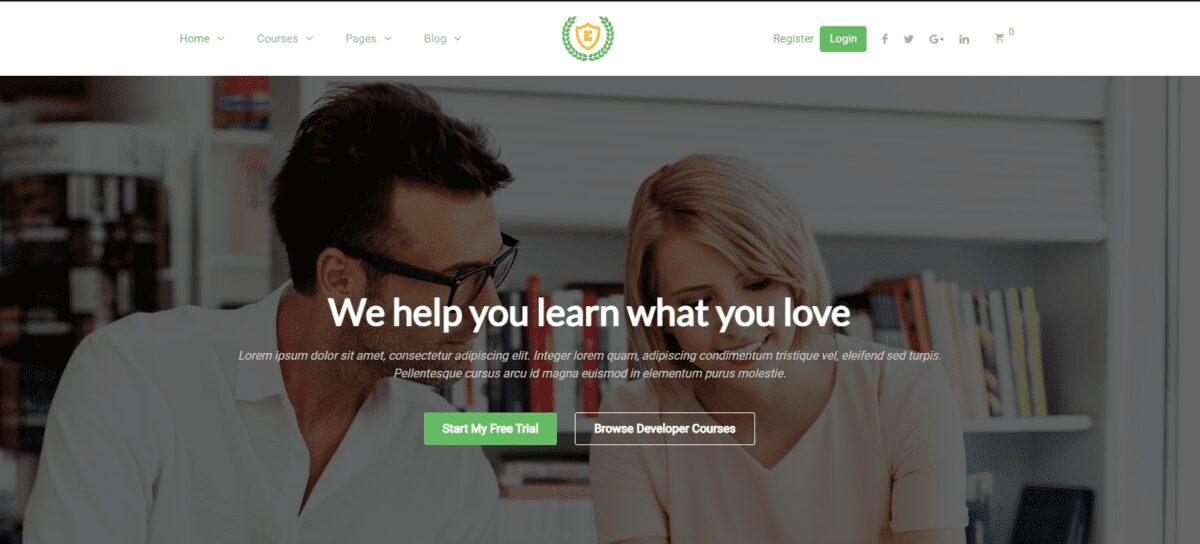
Eduma | Premium Education WordPress Theme

CorpTrain | Corporate Training LMS WordPress Theme

Coaching WordPrese Theme

Epsilon – eLearning WordPress Theme
3. Installing your new Education WordPress Theme – Education WP
After choosing the WordPress theme of your choice, the next step is installing it to your WordPress website. There’s a documentation page that goes with each theme. So, installing and using the theme, running your website after this tutorial will be very comfortable. There are also some video tutorials for installing these themes and a support forum around the themes so if you face any technical issue while running the site, you will know where to get help.
In this tutorial, I will guide you through the installation of the theme Education WP, which is also the best education WordPress theme. I highly recommend you using this theme since it’s fast, powerful with a very attractive design. Because all of our themes run on ThimCore so the installation part is almost the same for every theme.
First, go to your WordPress back-end. Then, go to Appearance > Themes > Add New> Choose Upload Theme > Choose the theme.
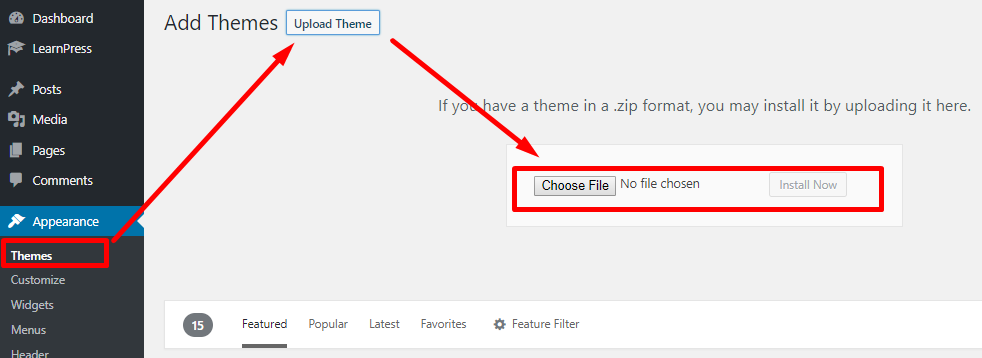
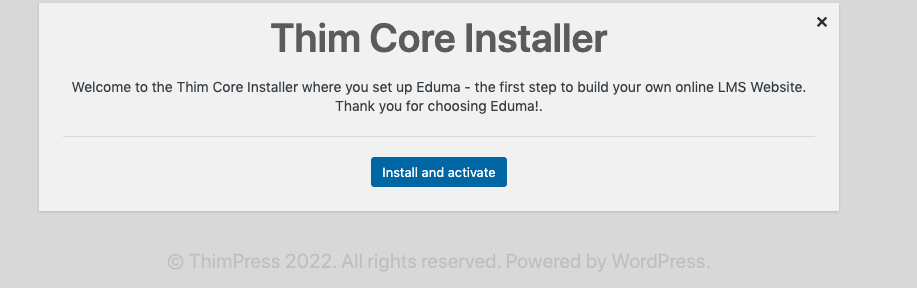
After the uploading process is finished, we will be redirected to a ThimCore Installation board. This is where the site will automatically install all required plugins and demo content. After that, it will transform your website into a beautiful design website like the Udemy. You will need to add some information: site’s title, choose your desired demo and login to your Envato account to confirm your theme license. This whole process only take a few minutes and all you need to do is just click on the Next button.
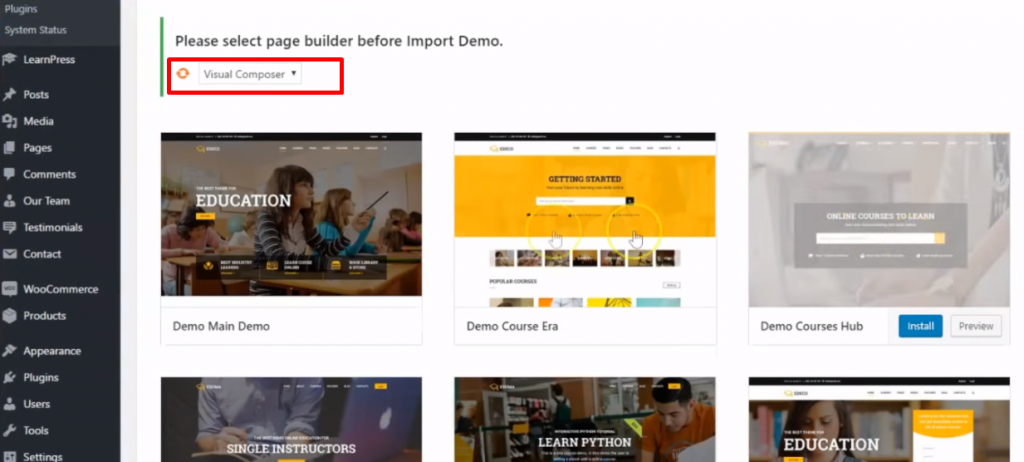
While choosing the demo you want to install, you may want to choose Visual Composer Page builder to import demo:
After the installation is done, you can visit your site again and it will amaze you. The site will be completely different from your old design and similar to the demo site that you chose. Now you’re about 80% close to your Udemy clone process. Your website is now more similar to Udemy than ever.
In case it is hard to understand, we made a video tutorial where we described step-by-step of how to install the theme Eduma | Premium Education WordPress Theme (a.k.a the best LMS and Education WordPress theme) and set it up to make it look 95% like an Udemy Clone with all of its function. The great thing is this theme will be updated regularly to adapt with the upcoming changes and to be better.
4. How to create your first online course
Create an LMS Website with LearnPress Once theme installation is complete, we will go through basic course editing features. Since we installed LearnPress LMS (and the theme already included LearnPress LMS), we will go to the admin dashboard to start configuring your course site.
Taking a look at the LearnPress backend, you will see the following menus:
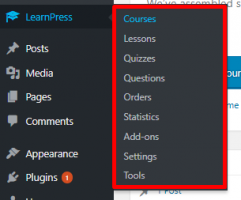
Each will be used to manage one specific part in your LMS. For example: you can manage all courses in the Courses menu. Each course consists of a number of Lessons and Quizzes and in each quiz, there are several Questions.
If you want to know who took which course, you can go to Orders. Statistics is the place to see some LearnPress stats. Add-ons is where you will install more features to LearnPress. In this case, because you bought our LearnPress premium theme, you wouldn’t have to worry about buying more premium add-ons. Just go there and you will be able to install and activate any premium feature of LearnPress. You can edit your LMS settings related to payment, pages, email, etc. in the settings menu.
4.1. Let’s try and create a course:
- Go to Courses menu, click on Add new to add a new course.
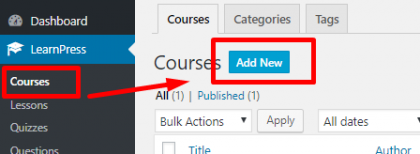
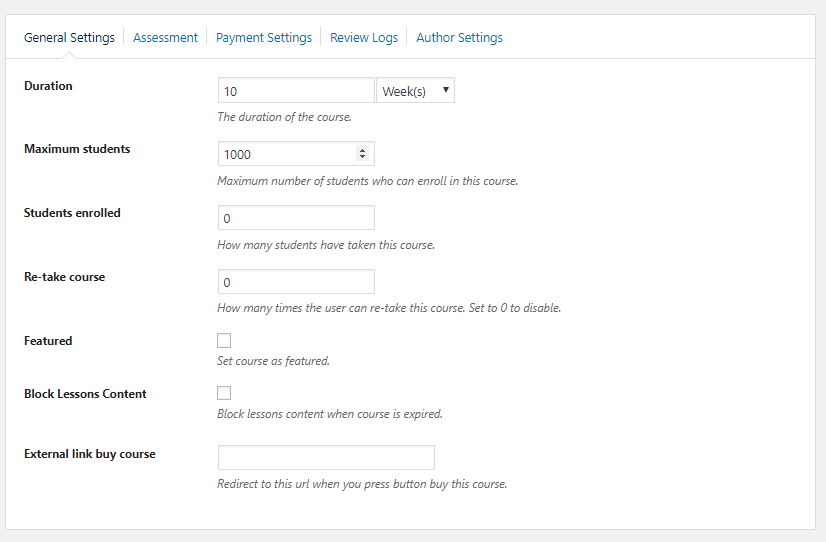
- You will see the course editor page with plenty of blank form fields to edit. This is where you will add your course title, course description and everything related to the course such as curriculum, course setting, course duration, course payment or even define terms for passing the course.
In the curriculum setting, you can just add the name of the lessons and then we will edit each lesson content and each lesson setting later. If you have prepared some lessons before, you can click on choose lesson to choose your prepared lesson.
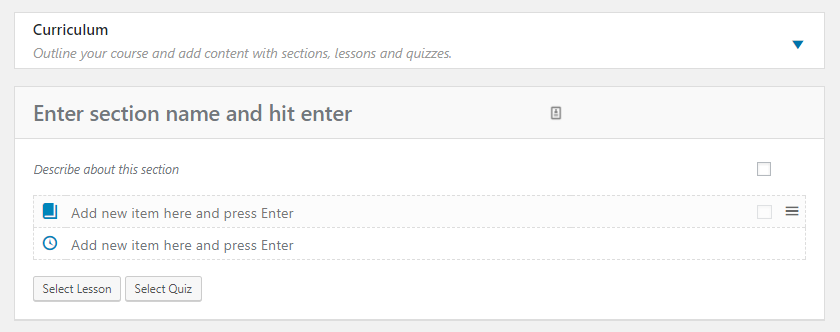
When everything is done, choose a Category for the course, add some tags, a featured image and click on publish to publish the course.
If you want to link your course to your current course on Udemy or other Online teaching platforms, in the General settings tab, you can find the External link buy course. Just add the link of your external course there and the student will be redirected to your external course whenever they click on Enroll
4.2. Editing Lessons: Editing
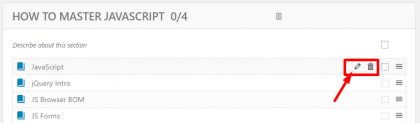
- Editing Lessons: After publishing courses, you have created all lessons. You can preview the course and edit each lesson while previewing it or in the course editor page, you will find an edit button for every lesson. Here you can add everything to your lesson in the lesson editor
.
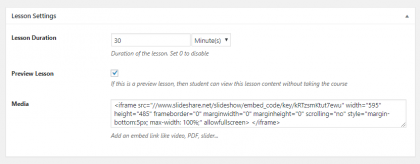
- Additionally, you can change the name of the lesson, change the content of the lesson to whatever you want, add images, texts, videos or even PowerPoint slides here. You can also add the lesson duration here and choose if it is a preview lesson or not. If you want the lesson to have a video format, find the Media box in the lesson setting and add an embed frame tag to your video.
- Here is an example of a nicely configured video lesson:
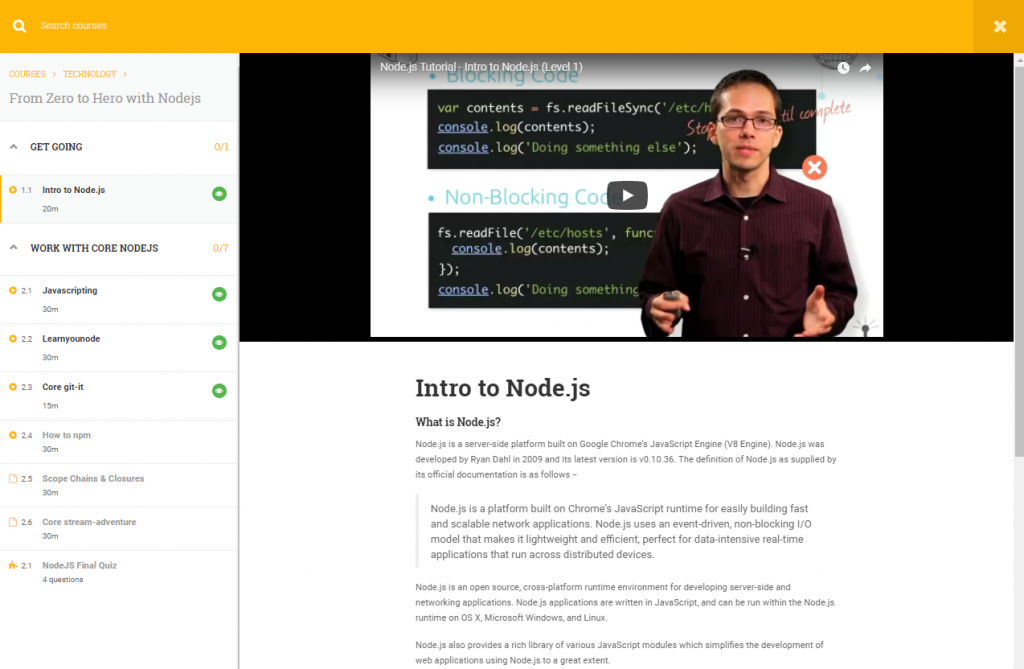
4.3. Editing Quiz
Editing Quizzes are a little bit more complicated than Lessons because they contain questions. You can edit quiz the same way you edit lesson content, by editing when previewing quiz content or via the curriculum. In the quiz editor, you can add title and description of the quiz. If you want your students to learn something before taking the quiz, you can add them there.
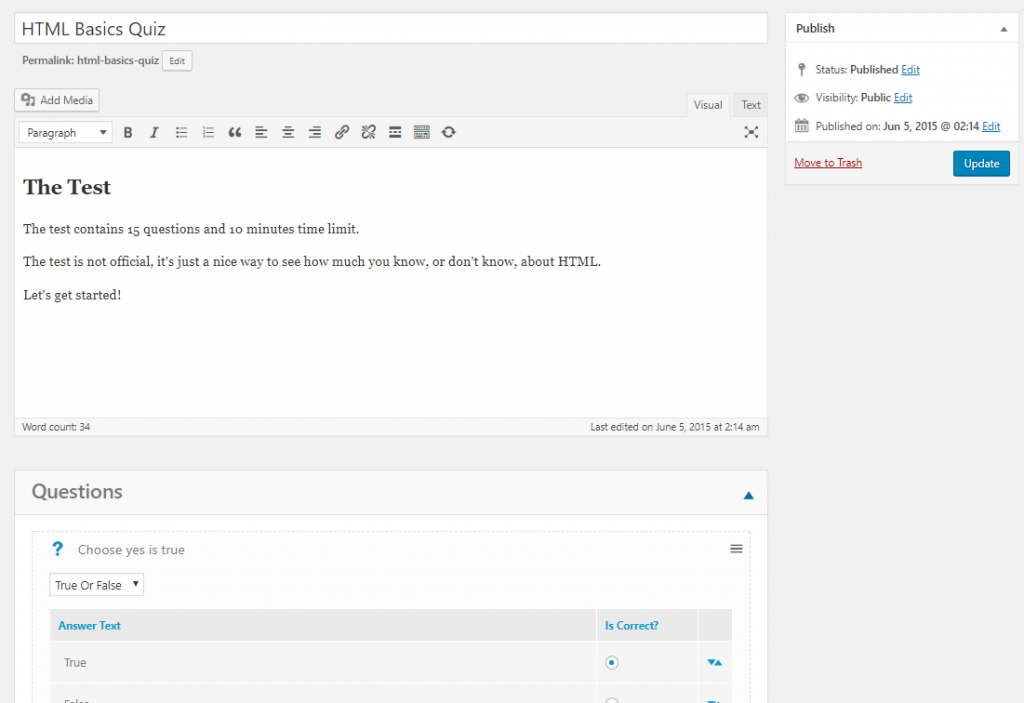
Below the general settings, there are some advanced quizzing settings:
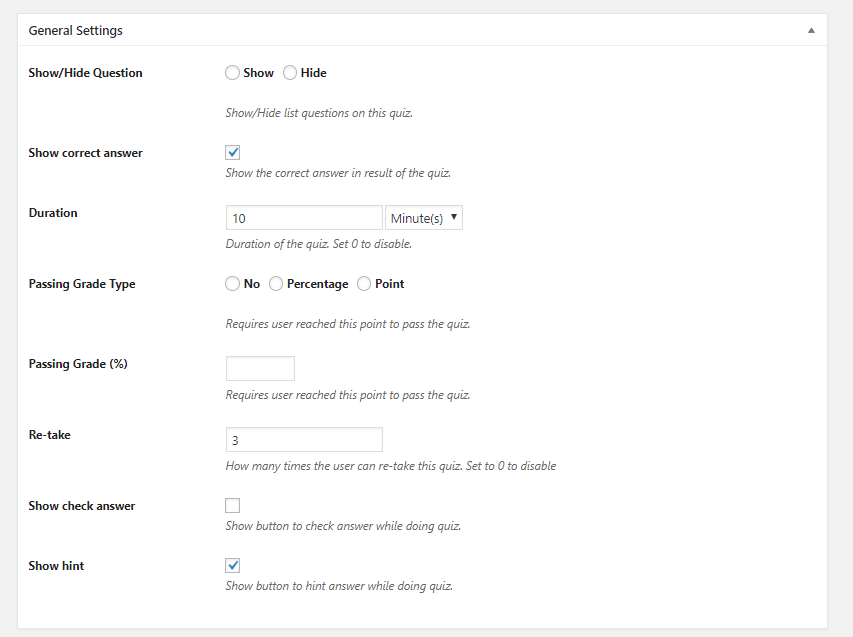
There’s the show/hide question. You can hide your question if you want. There’s also a Duration input for the quiz which limits the maximum amount of time your student can spend for the quiz. You can set to zero to disable it. Then you can specify the passing grade type of the quiz, by percentage or point or even disable it.
You can also give your students another chance by setting the re-take and you can also show the button “Check Answer” while the students are doing the quiz. You can also give hints to your questions.
4.4 Then we will start creating questions:
You can add each question, one by one. If you have created some questions before, you can click on Add Existing Question to import it to your quiz. There are several question types like Single Choice, Multiple Choice and True or False. You can add some more question types like Fill in the blank, etc. if you enable them in the Add-on tab.
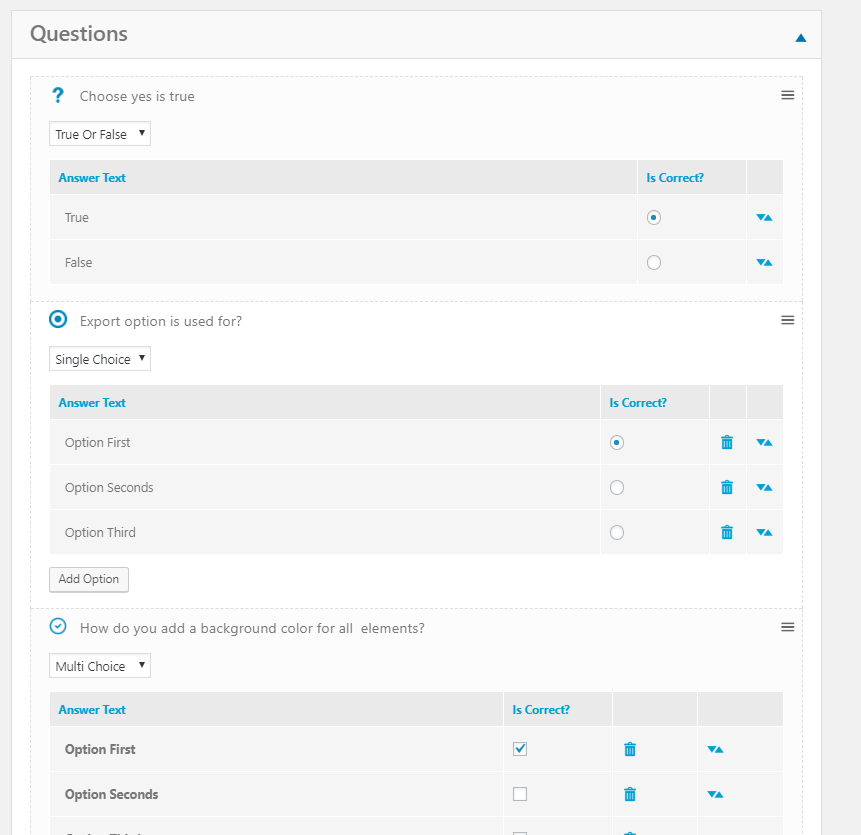
For this question editor, you will only be able to add question content and the correct answer. However, if you want to edit the detail of each question like giving long description, adding hints and explanation, give a different score to each question, you can save the quiz and click on the edit button right next to each question.
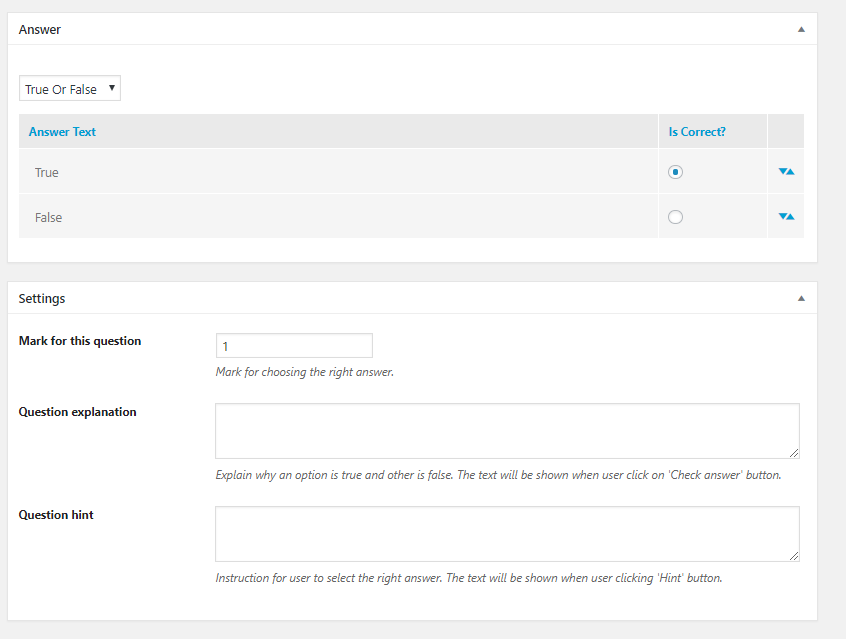
Here is each question’s general setting section. If you want to give explanation and hints to your students, you can add here. Remember, Hint appears before they submit the answer and Explanation displays after they have submitted the question.
That’s almost all you need to know to create and configure your online course.
5. Installing other LMS features for an Udemy clone
Besides giving content to the course, there are several other things you may need to add you your LMS website. They are: payment setting, coupon, instructor, etc. Now we will go through some of them:
5.1 How to get all of your Premium LearnPress Add-on Bundle?
In the past, the LearnPress Add-on Bundle is quite heavy. Therefore, users have to download them separately and then upload and install them separately from the theme.
However, now the technology has changed. You don’t have to download the LearnPress Premium Bundle separated from the theme anymore. It is automatically included in your theme package. Just update the theme to the latest version and it will be automatically installed to your site.
5.2 How to translate your WordPress theme to your language using Loco Translate Plugin
5.3 How to add instructors to your course – all about LearnPress instructors.
5.4 How to add membership/subscription plans to your online course site.
5.5 How to add and edit Certificate in your site
5.6 How to add coupon to your website
5.7 How to edit Mega menu
Final thoughts on creating Coursera, Udemy clone
I hope this article will give you a clue on what building an online course & Learning management system website and a Udemy clone website will be like. If you need any help, feel free to comment below and we will be happy to help.
Also, be creative, don’t follow the footsteps of others! Even though making a clone of a good business model can bring you benefits quick and easy, your product and your company should have some value and trademark of your own. LearnPress did an awesome job of giving you the tool to build an LMS and Education WordPress website. Education WP gave you the chance to build your website fast and easy, and unique. Now all you need to do is: build course content, curriculum, lessons, quizzes for your students and sell your courses.
If you are curious which of Education WP’s demo looks similar to Udemy the most, check this screenshot: